
Let’s paint the picture.
Your team is ready to roll out a new version of the app.
Just a minor change, maybe a config tweak or a new Docker image tag.
The pull request is merged.
Terraform runs.
It notices a “drift.”
Then decides something needs to be replaced.
And just like that…
An EC2 instance is terminated.
A Kubernetes workload restarts unexpectedly.
Production traffic drops.
PagerDuty starts screaming.
All because of a minor change.
Someone mutters quietly:
“Uh… Terraform just took down our workload.”
And there it is the fundamental issue.
Terraform is excellent at provisioning infrastructure but terrible for deployments.
Let’s break it down the DevOpsAgent way.
Terraform Manages Infrastructure Not Application Delivery
Terraform’s core philosophy is simple:
“Make reality match your desired infrastructure state.”
Its job is to compare:
- What your code defines (desired state)
- What’s actually running (current state)
This works beautifully for resources like:
- VPCs
- Subnets
- EC2 instances
- RDS databases
- IAM roles
- Security groups
These are long-lived and relatively static.
But application deployments?
They evolve constantly, sometimes every minute.
Terraform simply isn’t designed for that lifecycle.
1. Terraform Replaces—It Doesn’t Roll Out
Deployments should be gradual, safe, and observable.
Terraform doesn’t deploy, it replaces.
Example
Change an image tag in an ECS task or an EKS Deployment.
Terraform may decide:
-/+ Destroy and recreate the resourceWhich really means:
- Tear down the old version
- Spin up a new one
- Cross your fingers
There’s no rolling strategy.
No readiness checks.
No traffic management.
No rollback plan.
What good deployment looks like:
- Version N → N+1 gradually
- Pods replaced incrementally
- Traffic shifts in stages
- Health checks decide success
- Automatic rollback if things break
What Terraform does:
- Destroy old
- Create new
- Hope it works
That’s not deployment.
That’s replacement.
2. Terraform’s State Locks Block Fast Deployments
Deployments should be fast and reversible.
Terraform introduces:
- Remote state locking
- Merge conflicts
- Drift detection
- Long plan and apply times
Even for a tiny change, Terraform executes:
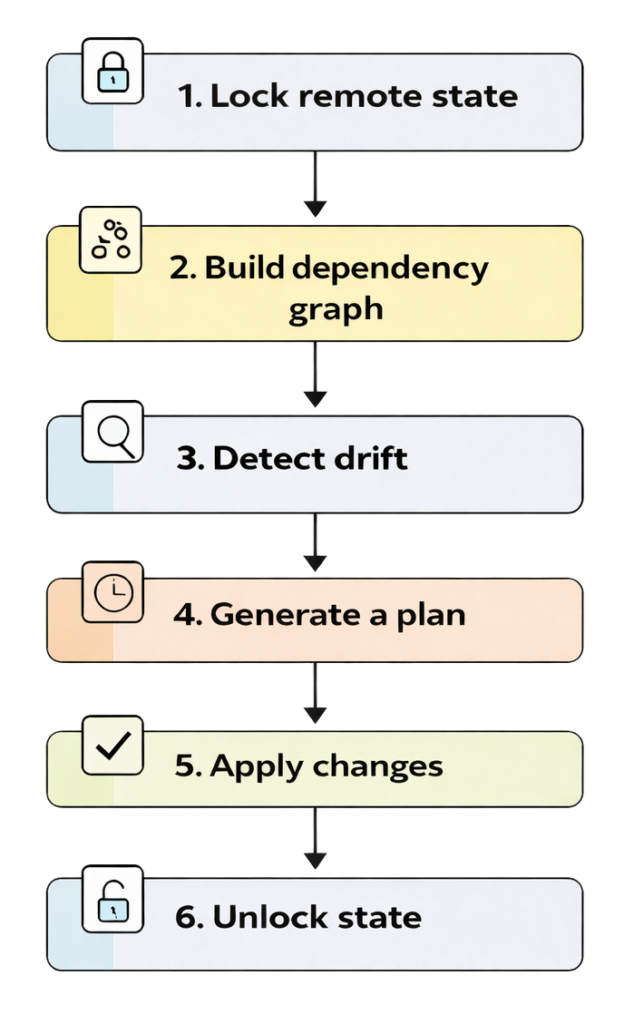
Every small update becomes a full infrastructure operation.
It’s like trying to rebuild your house just to paint one wall.
3. No Built-in Deployment Strategies
Safe deployments rely on proven strategies:
| Strategy | Needed for Safe Releases |
|---|---|
| Rolling updates |  |
| Blue/Green | |
| Canary | |
| Traffic shaping | |
| Health checks | |
| Automatic rollback | |
Terraform supports none of these.
It doesn’t understand:
- Traffic shifting
- Readiness checks
- Rollbacks
- Versioned software delivery
Terraform builds static infrastructure.
Applications are dynamic and volatile.
Mismatch.
4. Terraform Sees Deployments as Drift
Deployments are imperative:
“Deploy version 17. Right now.”
Infrastructure is declarative:
“This cluster should look like this.”
- In Kubernetes → new image tag triggers a rollout
- In ECS → new task revision is created
- In Terraform → drift detected, resource recreated
This leads to:
- Unnecessary restarts
- Full replacements
- Downtime
- Cascading failures
Terraform treats deployments as configuration mistakes.
5. Zero Observability During Deployments
During a rollout, teams expect:
- Logs
- Events
- Health checks
- Rollout status
- Alerts
- Automatic rollback
Terraform gives you:
Apply complete! Resources: 1 added, 0 changed, 1 destroyed.That’s it.
Terraform has no idea if:
- The app is healthy
- The rollout succeeded
- Users are impacted
- A rollback is needed
Terraform is blind during deployments.
6. Terraform Doesn’t Understand Runtime State
Applications change constantly:
- Images are rebuilt
- Pods restart
- Autoscaling kicks in
- Controllers reconcile
- Ephemeral resources appear and disappear
Terraform sees this as drift and tries to “fix” it.
This causes:
- Fights with orchestrators
- Unintended rollbacks
- Resource churn
- Downtime due to recreation
Terraform interprets normal runtime behavior as a problem.
The DevOpsAgent Mental Model
Let’s simplify everything into one table:
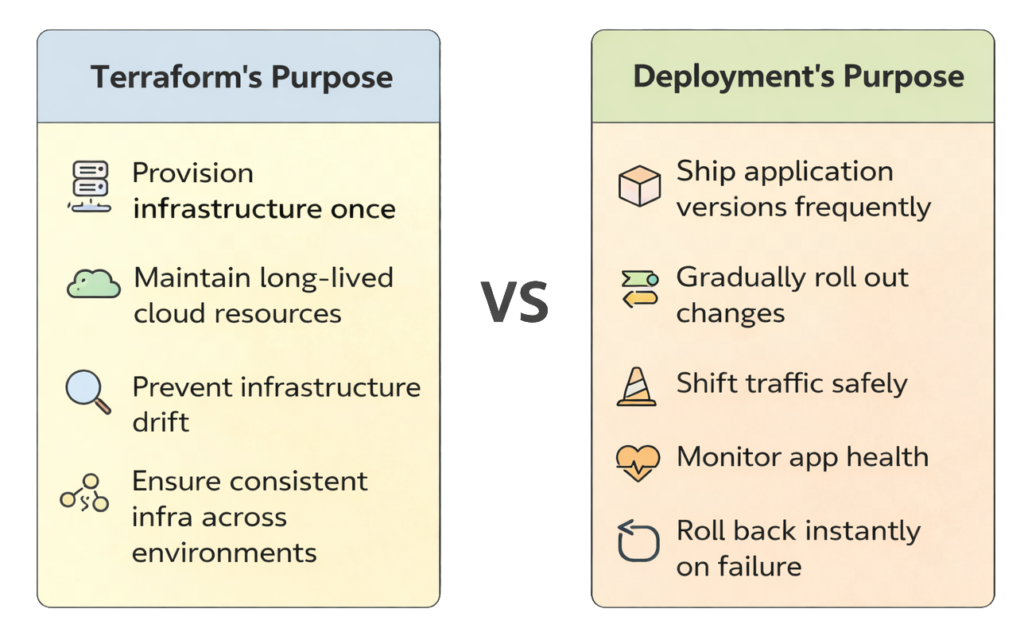
These are different goals.
Terraform simply isn’t solving the deployment problem.
Summary: Why Terraform Doesn’t Work for Deployments
| Requirement | Needed | Terraform Support | Verdict |
|---|---|---|---|
| Rolling updates | | ❌ | Not suitable |
| Zero downtime | | ❌ | Risky |
| Health checks | | ❌ | No rollback |
| Traffic shifting | | ❌ | No control |
| Multi-strategy rollout | | ❌ | Not possible |
| Fast iteration | | ❌ (slow) | Slows teams |
| Observability | | ❌ | Blind |
| Avoid destruction | | ❌ | Dangerous |
So What Should Handle Deployments?
Terraform is for infrastructure, not applications.
Use tools designed for deployments.
Kubernetes
| Purpose | Tool |
|---|---|
| Package deployments | Helm, Kustomize |
| Rollouts | Kubernetes Deployment Controller |
| Progressive delivery | Argo Rollouts, Flagger |
| GitOps | ArgoCD, Flux |
Containers (Non-K8s)
| Platform | Tool |
|---|---|
| ECS | ECS Deployment Controller |
| Lambda | SAM, Serverless Framework |
| EC2 | CodeDeploy, GitHub Actions |
General CI/CD
| Task | Tool |
|---|---|
| Build & test | GitHub Actions, GitLab CI, Jenkins |
| Deploy | ArgoCD, CodeDeploy, Cloud Deploy |
Final Thoughts from DevOpsAgent
Terraform is incredible at what it does:
Provisioning Infrastructure management State tracking Long-lived resources Cloud automation
But it falls apart as a deployment tool.
- It replaces instead of rolling forward
- It lacks deployment strategies
- It can’t observe app health
- It can’t roll back safely
- It’s slow and state-heavy
- It mistakes deployments for drift
The DevOpsAgent rule of thumb:
“Use Terraform to build the environment.”
“Use proper deployment tools to run the show.”
Terraform builds the stage.
Your deployment pipeline puts on the performance.
Get that boundary right and your team avoids downtime, noise, and chaos.

