
If you’ve worked in cloud or DevOps long enough, you’ve probably experienced this moment:
You open the AWS Console…
Click through a dozen screens…
Create a VPC…
A subnet…
A security group…
An EC2 instance…
And then someone asks:
“Can you create the same setup for QA… and Production… and maybe a sandbox too?”
And suddenly the entire manual setup becomes a multi-environment nightmare.
This is exactly the kind of chaos Terraform was built to eliminate — consistently, predictably, and repeatably.
Welcome to the DevOpsAgent’s guide to Terraform for beginners, here you’ll understand the why, the how, and most importantly — the real-world application of Terraform (by HashiCorp).
What Exactly Is Terraform?
Terraform is an Infrastructure-as-Code (IaC) tool that lets you build cloud infrastructure using code instead of manually clicking through cloud consoles.
It converts your ideas of infrastructure into declarative files, and then creates the exact same setup every single time.
Terraform treats infrastructure like source code, bringing the same benefits of version control and repeatability to cloud resources as Git does to software development.
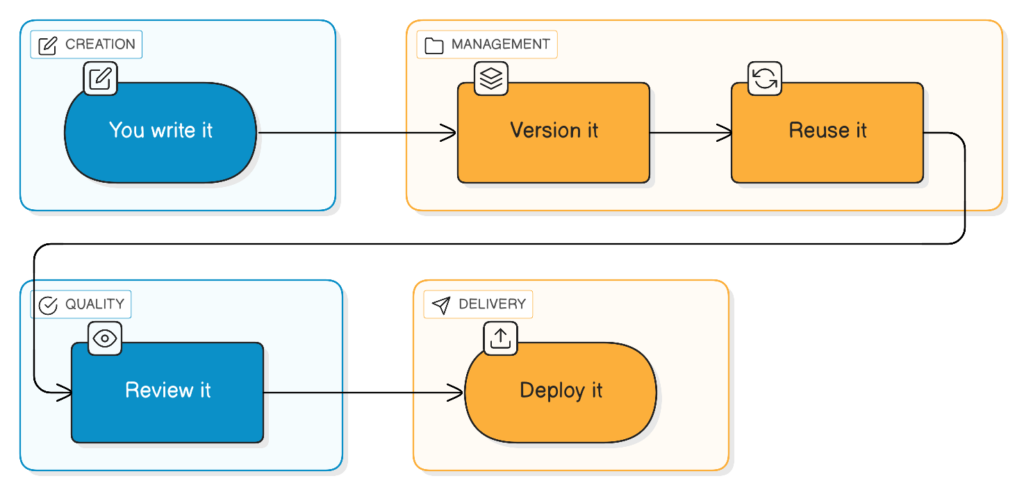
This single shift—from manual to automated infra—changes your DevOps productivity forever.
Why Terraform Matters (And Why Every DevOps Engineer Should Learn It)
Terraform gives teams something manual provisioning never can:
| DevOps Challenge | What Happens With Manual Work | What Terraform Gives You |
|---|---|---|
| Inconsistent setups | Dev ≠ QA ≠ Prod | Identical infra across environments |
| Human error | Typos, missing rules, wrong CIDRs | Predictable deployments |
| No documentation | Infra lives in people’s heads | Infra is documentation |
| Hard to scale | Recreating infra is painful | Code reuse + modules |
| No auditability | No change history | Git + PR reviews (Version Controlled) |
Terraform is not “just a tool.”
It’s a mindset shift toward automation, consistency, and reliability.
How Terraform Works (Explained Like You’re 8)
Here’s Terraform’s workflow, simplified:
1. Write Code (.tf files)
2. terraform plan (preview changes)
3. terraform apply (build infra)
4. terraform.tfstate (tracks actual deployed resources)
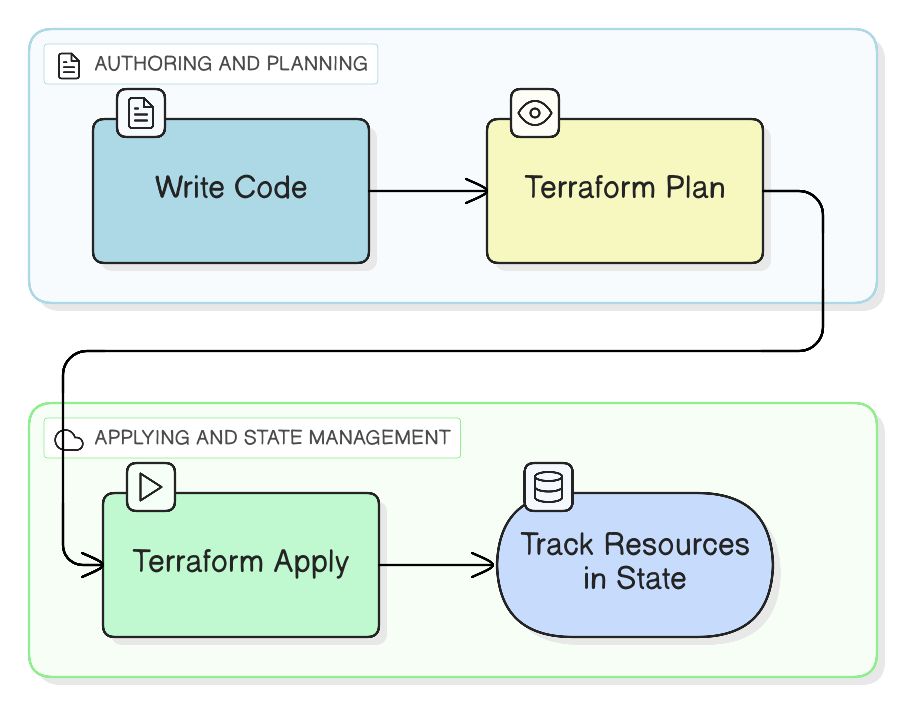
If you remember nothing else, remember this:
Terraform always compares:
“What you WANT” (your code)
vs
“What you HAVE” (your state).
This is how it decides what to create, update, or destroy.
Terraform Concepts — Explained the DevOpsAgent Way
Let’s break down the key building blocks.
1. Providers — Terraform’s Cloud Translators
Providers tell Terraform which cloud or platform you’re talking to.
Think of them as:
“Drivers that let Terraform speak AWS, Azure, Kubernetes, GitHub, Cloudflare, etc.”
Examples:
| Provider | What It Manages |
|---|---|
aws | VPC, EC2, IAM, S3 |
google | GKE, Compute |
azurerm | VNets, AKS |
kubernetes | Pods, Deployments |
github | Repos, teams, branches |
Thanks to providers, Terraform is cloud-agnostic.
2. Resources — The Actual Cloud Components
A resource in Terraform = a real object in cloud.
| Terraform Resource | Real Cloud Object |
|---|---|
aws_vpc | AWS VPC |
aws_instance | EC2 VM |
aws_s3_bucket | S3 bucket |
aws_security_group | Security group |
Each resource has:
- Arguments (inputs)
- Attributes (outputs)
- Dependencies
You already use these intuitively.
3. Variables — Your Reusable Inputs
Variables allow flexibility across environments:
variable "instance_type" {
default = "t3.micro"
}
Prod wants bigger VMs?
QA wants smaller ones?
No problem — just pass different values.
No duplicate code needed!
4. Outputs — Useful Information After Deployment
Outputs expose what Terraform created:
output "instance_ip" {
value = aws_instance.web.public_ip
}
Think of them as “infra outputs to feed other systems.”
5. State — The Most Important Terraform Concept
This is where beginners struggle.
Terraform State is simply:
“Terraform’s memory of what it created.”
Without state, Terraform is blind.
With state:
- It knows what’s deployed
- It knows what changed
- It knows what to delete or update
Below is a mental model:
*********************************
| terraform.tfstate |
*********************************
| VPC ID: vpc-123 |
| Subnet ID: subnet-456 |
| EC2: i-789 |
| SG: sg-abc |
*********************************
In companies, state is stored in S3 + DynamoDB to avoid corruption and allow team collaboration. We do not check-in the state file to a Git repository.
6. Modules — The Secret Sauce of Real-World Terraform
Resources = Lego bricks
Modules = full Lego kits.
Modules let you package reusable infrastructure:
- A VPC module
- An EC2 module
- An RDS module
- A Load Balancer module
Enterprises run on modules because modules bring:
✔ consistency
✔ reusability
✔ maintainability
✔ security guardrails
Real-World Example — Deploying a Web Server Using Terraform
Let’s walk through a scenario you’d encounter as a DevOps engineer.
Goal:
Launch a web server (EC2) inside a VPC with a subnet and security group.
Terraform creates this architecture:
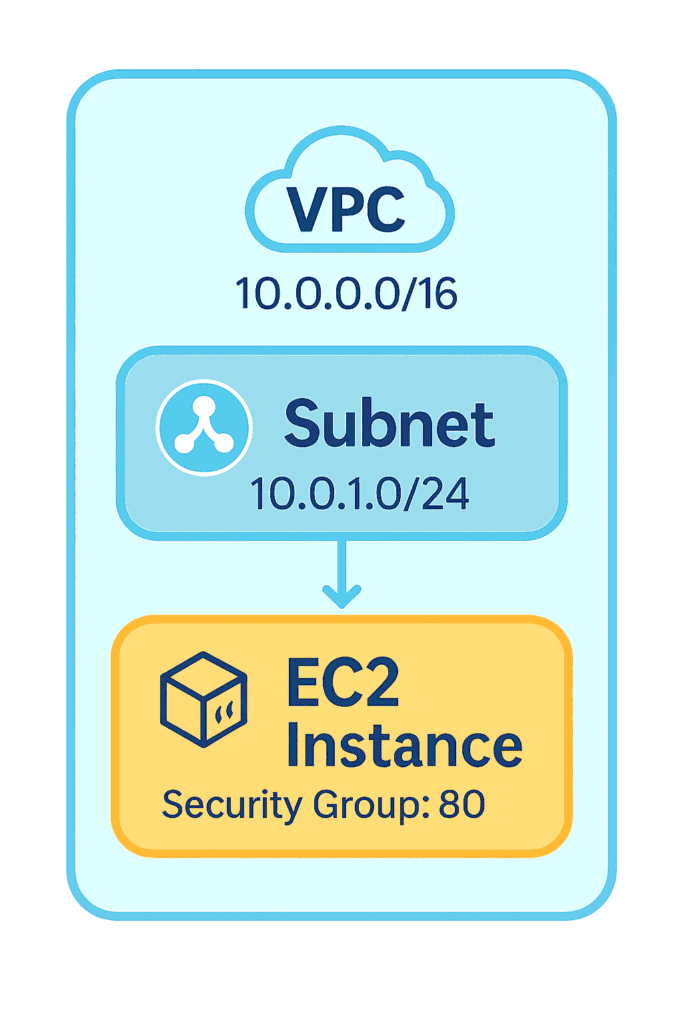
Terraform Workflow:
| Step | What Happens |
|---|---|
| 1. Configure AWS provider | Set your region |
| 2. Create VPC | Define the CIDR |
| 3. Create Subnet | Attach to the VPC |
| 4. Create Security Group | Allow port 80 |
| 5. Launch EC2 | Attach SG + subnet |
Terraform provisions everything automatically — consistently — every time.
Where Do Companies Use Terraform?
Terraform powers modern cloud operations:
✔ Cloud foundations (VPCs, networks, subnets)
✔ Multi-account AWS organizations
✔ Kubernetes clusters (EKS, GKE, AKS)
✔ Application infrastructure (EC2, RDS, ALB)
✔ CI/CD pipelines
✔ DNS, CDN, WAF automation
✔ Creating dev/stage/prod environments automatically
If it’s infrastructure, Terraform can automate it.
Top Terraform Mistakes Beginners Make (Learn From This!)
| Mistake | Why It’s Bad | DevOpsAgent Fix |
|---|---|---|
| Using local state | Corruption + no collaboration | Use S3 + DynamoDB |
| Hardcoding values | No reuse | Use variables |
One giant main.tf file | Messy, unreadable | Split into modules |
| No tagging strategy | Billing chaos | Enforce standard tags |
| Apply on master | Risky | Use PRs + CI/CD checks |
| No backend state locking | Parallel runs break state | Enable DynamoDB locking |
Final Thoughts — Why Terraform Is Worth Your Time
Terraform is powerful, elegant, scalable, and cloud-agnostic.
Whether you’re building small sandbox environments or managing enterprise cloud foundations, Terraform:
- Brings consistency
- Removes manual effort
- Improves reliability
- Enables collaboration
- Helps you scale infrastructure confidently
If you’re serious about DevOps, Terraform isn’t optional — it’s foundational.

